
To provide better support after releases, we will no longer release product updates on Saturdays. Our next release, version 5.3.10, will go out according to the schedule below:
- US clients: Tuesday, August 11th, beginning at 10:00pm ET
- Australian clients: Wednesday, August 12th, beginning at 11:00pm AEST (9:00am ET)
- European clients: Wednesday, August 12th, beginning at 10:00pm BST / 11:00pm CEST (5:00pm ET)
What’s new?
🖼️ Organization and Request Overview Page Configuration: You can now tailor the Organization and Request record pages to match how your foundation actually works. As an admin or user with the permission “Manage Record Page Layouts” you'll be able to:
- Show or hide sections and fields that aren't relevant to your process
- Reorder sections and fields so the most important information appears first
- Rename sections to match your organization's own terminology
- Add helpful tooltips to any field, so staff can hover (or tab to it with a keyboard) for a quick explanation of what it's for
- Bring custom fields out of their own tab and place them directly on the main page, right alongside your standard fields
- Reorder or hide tabs on Organization and Request records
How it works: Changes are made in a new Record Page Layout editor in Admin Settings. You can preview your changes against a real record before going live, save your work as a draft, and publish it whenever you're ready. Once published, everyone on your team sees the update immediately. If you want to undo a change, you can reset back to the original GivingData default layout.
This is a foundation-wide setting — everyone at your organization sees the same layout.
📚 Learn more: Configure Organization and Request Overview Pages
🗂️ Assign Requests to more than one Portfolio: Requests can now be linked to more than one Portfolio. All associated Portfolios will be listed under the Portfolios field on the Request Overview page and within the Portfolios Super Search column.
📚 Learn more: Portfolios
📌 Your Table Views Will Now Remember How You Left Them: Any time you resize a column, reorder columns, sort a list, or pin a column in place, that setup will now stick — even after you navigate away and come back later. No more re-arranging the same table every time you open it. This rolls out across all the grid/table views in the product, so the experience is consistent no matter where you're working.
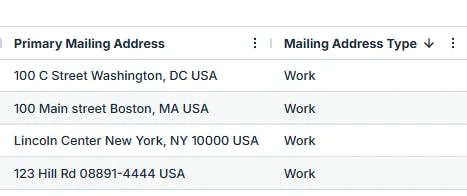
🔍 Super Search - Mailing Address Type Column: A new column for "Mailing Address Type" for Super Searches is now available, showing the org-configured label (e.g. "Home," "Work") of each contact's primary mailing address.
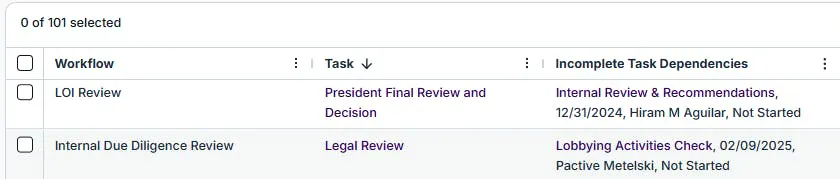
🔍 Super Search - 'Incomplete Task Dependencies' to Workflow Tasks Super Search:
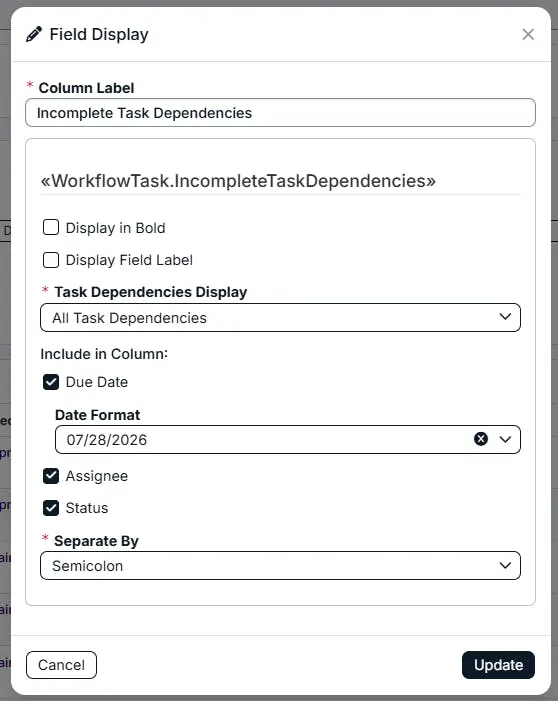
A new search criteria "Has Incomplete Task Dependencies" and a new column “Incomplete Task Dependencies” is now available for Workflow Tasks Super Searches. Column formatting includes: Displaying all task dependencies, Next task dependency, the task due date, assignee, and task status. Incomplete tasks can be opened and edited directly from the results list.

🔌 MCP Connector: The MCP Connector securely connects GivingData to the AI platforms your team already uses. Information about grants, contacts, and Organizations are always one question away. No exports, manual data-entry, or context switching. Supported LLMs are: Claude, Copilot, and ChatGPT. The MCP Connector is available at the GivingData Enterprise Tier. Reach out to your CSM to get this feature enabled.
📚 Learn more: MCP Connector: Integration Checklist
🛠️ Tech Modernization
The following pages have been modernized with minimal UI changes including in-line editing and accessibility improvements.
✨ Organization and Request Records: The Organization and Request records and overview pages have received an updated user interface to maintain consistency and improve accessibility. These changes are primarily visual improvements to the user interface, including new layouts and locations of fields on the overview pages, and in-line editable fields. On the Request Record, a new “Options” menu is available to enable regranting, track expenditure responsibility, reassign the request to a different organization, or to delete the request.
📚 Learn more: User Interface Updates (Organization Records > Overview Tab and Request Records > Overview Tab)
✨ User Notifications update: The user Notifications modal has an updated user interface to maintain consistency and improve accessibility. These changes do not contain changes in functionality but are visual improvements to the user interface.
📚 Learn more: User Interface Updates (User Notifications > Notifications Modal)
✨ My Tasks: The My Tasks modal has an updated user interface to maintain consistency and improve accessibility. These changes do not contain changes in functionality but are visual improvements to the user interface.
📚 Learn more: User Interface Updates (My Tasks > My Tasks Modal)
✨ Board Portal Settings - Edit/Add List View: The Board Portal Setting for Edit/Add List View has an updated user interface to maintain consistency and improve accessibility. These changes do not contain changes in functionality but are visual improvements to the user interface.
📚 Learn more: User Interface Updates (Board Portal > Board Portal Settings - Add/Edit List View Modals)
✨ Dockets Dashboard- Criteria Filters: Criteria Filters on the Dockets Dashboard have an updated user interface to maintain consistency and improve accessibility. These changes do not contain changes in functionality but are visual improvements to the user interface.
📚 Learn more: User Interface Updates (Dockets > Dockets Dashboard - Criteria Filters)
🐛 Bug Fixes
- Charity Check Batch Verification: Batch charity status verification was completing per the notification but not actually updating the data on the organization record’s Finance and Compliance page. This has been resolved.
- Document Edit Properties & Manage Button: On the documents list, the "Edit Properties" option was missing from the dropdown and the "Manage" button was not opening documents as expected. This has been resolved.
- Amendment Tool Grant End Date Calculation: When editing a request amendment, if "automatically calculate grant end date" was not selected first, the system failed to auto-generate the end date and incorrectly greyed out the field, preventing manual entry. This has been resolved.
- Organization Website Link: Clicking an organization's website link from the About tab was redirecting to the GivingData homepage instead of the organization's website. This has been resolved.
- Batch Email Preview with Long Request Titles: Request titles longer than 72 characters broke scrolling in the batch email preview, preventing users from reviewing and sending batch emails for those requests. This has been resolved.
- Requirement & Payment Notes Not Refreshing: After adding a Note or Long Note on a requirement or payment and clicking Update, the list on the Requirements tab did not reflect the change until the page was manually refreshed. This has been resolved.
- Batch Code Replacement: Using the batch function to replace a request code showed a success notification, but the change was not actually applied to the underlying request record. This has been resolved.
- Docket Detail Default Sort Order: Default list views for docket detail sections (Planning, Pending, Approved, and Declined Requests) were not honoring the configured sort order (e.g., by Org Name ascending). This has been resolved.
- Payment ID Link in Workflow Dashboard: The Payment ID column in the Workflow Dashboard displayed as a hyperlink but clicking it did nothing, preventing users from navigating directly to the payment record. This has been resolved.
- Grantee Portal Contact options for Phone/Email/Address: Even when only "Work" was selected in contact default settings for phone, email, and address, the other options (personal, fax, mobile, other) still appeared as selectable to grantees in the portal. This has been resolved.
- In App Notifications: Dismissing a notification did not update the notification alert count until the page was manually refreshed. This has been resolved.
- Dismissing Notifications - List Display Issues: Dismissing multiple notifications at once could leave the notifications list blank, truncated, or jumped to a random scroll position, with the checkbox to dismiss notifications also being hard to locate in long lists. This has been resolved.
💡 If you encounter any issues, reach out to our Support Team —we're happy to help!
📀 Replica Database Schema Changes
Clients without a replica database in their subscription can disregard these technical details. This section is intended to notify administrators about changes to the database schema. If your subscription includes a replica database, these details may be relevant to the administrators managing your replica database or advanced data visualization tools like Power BI. For further assistance, please contact our support team.
Dropped Columns
| Table | Column Dropped | Notes |
|---|---|---|
| Requests | PortfolioId | Removed now that Request↔Portfolio is many-to-many via the new RequestPortfolios table. If your reports reference Requests.PortfolioId, update them to join through RequestPortfolios instead, or use the new Requests.PortfolioAssignments column for a display-friendly list of names. |
Renamed Columns
None in this release.
Index Changes (no query impact expected, listed for completeness)
Any foreign-key-backed index on Requests.PortfolioId was dropped along with the column and its foreign key constraint (index name was environment-generated, so no fixed name to reference).
New Tables
| Table | Purpose | Key Columns |
|---|---|---|
| RequestPortfolios | Junction table enabling a Request to be assigned to multiple Portfolios | RequestId (FK Requests), PortfolioId (FK Portfolios) — composite PK on both |
New Columns on Existing Tables
| Table | New Column | Type | Notes |
|---|---|---|---|
| Requests | PortfolioAssignments | nvarchar(max) | Denormalized, semicolon-separated list of all Portfolio names assigned to the Request; backfilled from RequestPortfolios. |
| McpPendingAuths | IdentitySubdomain | nvarchar(512), nullable | Supports SSO logins tied to an identity provider subdomain. |
| McpAuthCodes | IdentitySubdomain | nvarchar(512), nullable | Same as above. |
Modified / New Views
| View | Change |
|---|---|
| ReviewResponses | Dropped and recreated. AnswerValueText column logic updated so numeric answer types (Rating, Overall Rating, Int, Currency, Percentage, Decimal) sort in true numeric order rather than as plain text. No existing columns were removed. |